
- Third-Part AODA Audit
- AODA Compliance Audit
Third-Party AODA Audit: When You Need One and What to Expect
A third-party accessibility audit is one conducted by an external specialist who is independent of your organization. It differs from an internal review not just in who conducts it, but in what it is worth: third-party audits carry significantly more credibility in compliance contexts, complaint responses, and procurement requirements.
Quantity Discounts
Price per course
6 to 20 courses
$20.95
21 to 50 courses
$17.95
51 to 200 courses
$13.95
201+ courses
Custom offer
A third-party accessibility audit is one conducted by an external specialist who is independent of your organization. It differs from an internal review not just in who conducts it, but in what it is worth: third-party audits carry significantly more credibility in compliance contexts, complaint responses, and procurement requirements than assessments done in-house.
Not every organization needs a third-party audit at all times. But there are specific situations where commissioning one is not just advisable — it is the most defensible decision your organization can make.
What makes an audit 'third-party'?
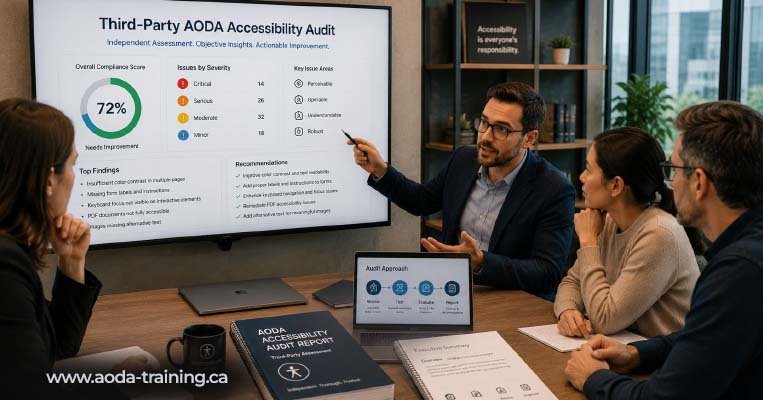
A third-party accessibility audit is conducted by a specialist who has no direct stake in the outcome — not an employee of your organization, not the agency that built your website, and not a platform provider whose product is being tested. The independence matters because:
- An agency that built your website has an incentive to underreport accessibility issues it introduced during development
- An internal team member may not have the specialized WCAG expertise or AT testing skills that a dedicated accessibility specialist brings
- Regulators, funders, and legal counsel place more weight on findings from an independent party who has no conflict of interest
- A third-party auditor brings perspective from testing many different websites and technologies — recognizing patterns that an internal reviewer familiar with their own content might miss
Your web development agency, even if they offer accessibility services, is not an independent third party when auditing work they built. Neither is a team member who switches hats from developer to auditor. And a platform's built-in accessibility checker is not an audit at all. Independence means the auditor has nothing at stake in the outcome.
Eight situations where a third-party audit is the right choice
How to choose a third-party AODA audit provider
The accessibility audit market includes dedicated consultancies, generalist web agencies with accessibility practice areas, and individual consultants. Quality varies significantly. Here is how to evaluate potential providers.
| Question to ask | What to look for |
|---|---|
| Does the provider conduct manual testing, or only automated scanning? |
✓ Green flag: Explicit confirmation that manual WCAG testing is included alongside automated tools. ✗ Red flag: Quote is based on axe or Lighthouse reports only — this is not a professional audit. |
| Do they test with screen readers? |
✓ Green flag: Confirms NVDA + Firefox and VoiceOver + Safari testing by a trained AT tester. ✗ Red flag: Describes 'checking ARIA attributes' as their AT testing — this is code review, not AT testing. |
| What credentials does the testing team hold? |
✓ Green flag: IAAP WAS (Web Accessibility Specialist) or CPACC, or demonstrable AT testing experience. ✗ Red flag: No accessibility-specific credentials; accessibility offered alongside SEO, UX, and general web services. |
| Can they provide a sample audit report? |
✓ Green flag: Sample shows specific WCAG references, severity ratings, screenshots, code examples, and fix guidance per issue. ✗ Red flag: Sample report is a spreadsheet of URLs with brief descriptions or an automated scan export. |
| Is your organization's agency the auditor? |
✓ Green flag: Independent auditor with no prior work on the site being tested. ✗ Red flag: The audit is conducted by the same agency that built the website — not an independent third party. |
| What does the engagement include post-report? |
✓ Green flag: A walkthrough call to review findings with your team; option for post-remediation retesting. ✗ Red flag: Report delivered with no follow-up support or explanation. |
What to expect from a third-party AODA audit engagement
| Stage | What happens | Client involvement |
|---|---|---|
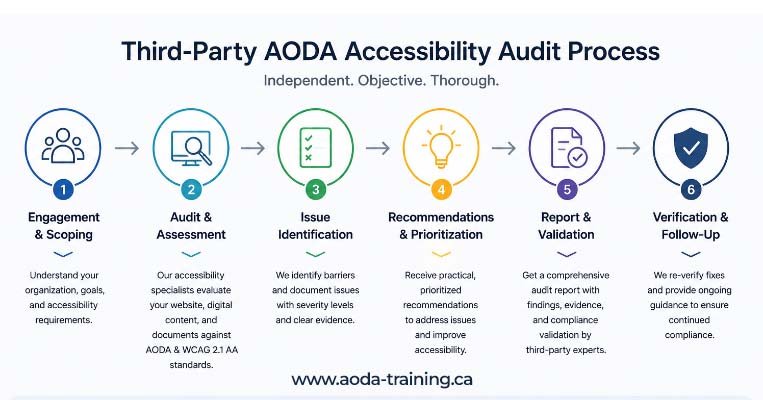
| Scoping call (day 1–2) | The auditor defines the pages to be tested, confirms the testing standard (WCAG 2.0 Level AA), agrees on the report format, and discusses any known issues or areas of concern. | Provide a list of key pages, user journeys, and any previous audit findings. One hour of your time. |
| Testing (days 3–10) | The auditor runs automated scans, manual WCAG testing, and screen reader evaluation across the agreed scope. For full AODA audits, this includes document and policy review. | Minimal — provide login credentials for authenticated pages if needed. Respond to any technical questions promptly. |
| Report production (days 11–14) | The auditor consolidates all findings, assigns severity ratings, writes remediation guidance, and produces the executive summary and remediation roadmap. | None — auditor working independently. |
| Report delivery and walkthrough (day 14–16) | The report is delivered. A walkthrough call reviews the key findings, explains the remediation roadmap, and answers questions from your development and compliance teams. | Attend with your developer, content lead, and compliance lead. One to two hours. |
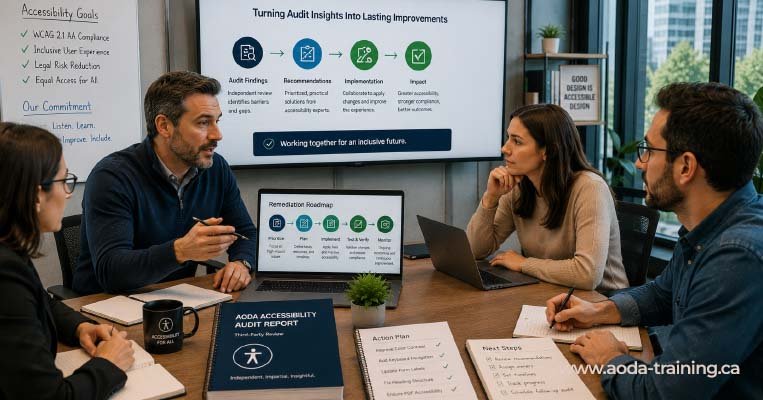
| Remediation period | Your team implements fixes based on the remediation roadmap. The auditor is available for clarification questions on specific findings. | Lead your development team through the issues list. Track progress against the remediation roadmap. |
| Retesting (optional, days 30–60 post-delivery) | The auditor retests resolved issues to confirm they have been fixed correctly. Produces a retest report documenting which issues pass and which require further work. | Provide access to the updated site. Review retest findings with your development team. |
Internal audit vs third-party audit: when each is appropriate
| Use case | Internal audit | Third-party audit |
|---|---|---|
| Day-to-day development QA | ✓ Ideal | Not needed |
| Content team checks before publishing | ✓ Ideal | Not needed |
| Annual internal compliance review | ✓ Suitable | Recommended as supplement |
| Pre-launch testing for new website | △ Partial | ✓ Recommended |
| Filing AODA compliance report | ✗ Insufficient | ✓ Required |
| Responding to accessibility complaint | ✗ Insufficient | ✓ Required |
| Government compliance review response | ✗ Insufficient | ✓ Required |
| Procurement compliance evidence | ✗ Insufficient | ✓ Required |
| Post-redesign validation | △ Partial | ✓ Recommended |
Frequently asked questions
Is a third-party AODA audit legally required?
- Not explicitly. AODA does not require organizations to commission a third-party audit. However, the compliance report that organizations with 20 or more employees must file every three years is a legal declaration of compliance. Filing it based on an internal review that lacks professional methodology, AT testing, or independence is a legal risk. Most organizations commission a third-party audit before filing to ensure the declaration is well-founded.
How long does a third-party AODA audit take?
- From initial scoping to report delivery, a third-party audit of a small to medium website typically takes two to four weeks. A full organizational audit covering website, policies, training, and employment documentation typically takes four to six weeks. Timeline depends on auditor availability, website complexity, and how quickly your organization can provide necessary access and documentation.
Can my web agency audit our website for AODA compliance?
- Not independently. Your web agency is not an independent third party if they built or currently manage the website being audited. Their interests are not fully aligned with finding and reporting all accessibility issues — particularly those introduced during their own development work. If your agency offers accessibility services, they can be involved in remediation, but the audit itself should be conducted by an independent party.
What credentials should an AODA auditor have?
- The International Association of Accessibility Professionals (IAAP) offers two widely recognized credentials: the Web Accessibility Specialist (WAS), which covers technical WCAG testing and screen reader evaluation, and the Certified Professional in Accessibility Core Competencies (CPACC). WAS is the more relevant credential for WCAG testing. Ask any potential auditor about their AT testing experience specifically — credentials are useful indicators but hands-on screen reader testing skill is what matters in practice.
What documentation should I have ready before an audit starts?
- For a website audit: a list of key pages and user journeys to prioritize, login credentials for any authenticated sections, and details of any previous audit findings. For a full AODA organizational audit: your written accessibility policy, your multi-year accessibility plan, training records, and any compliance report filings. Having these ready at the start speeds up the process significantly.
How do I know if an audit report is credible?
- A credible third-party audit report documents the testing methodology clearly, names the specific tools and AT combinations used, includes the dates of testing, provides WCAG criterion references and severity ratings for every issue, includes screenshots or code excerpts, and gives specific remediation guidance. A report that lists issues without context, does not mention testing methodology, or is clearly an automated scan export presented as a manual audit is not credible.
Empower Your Team with Digital Accessibility
Ensure compliance, reduce legal risks, and build inclusive digital experiences.
Start AODA training for your team →Commission an independent AODA accessibility audit
Our third-party AODA audits are conducted by experienced accessibility specialists, fully independent of your development team. We cover automated scanning, manual WCAG testing, and screen reader evaluation — and we deliver a report your development team can act on and your compliance team can file with confidence.
- Independent assessment with no prior involvement in your website or systems
- Manual WCAG 2.0 Level AA testing by an accessibility specialist
- Full AODA organizational review option: website + policies + training + employment
- Automated scanning with axe and WAVE across all scoped pages
- Screen reader testing: NVDA + Firefox (Windows) and VoiceOver + Safari (macOS and iOS)
- Walkthrough call with your team + optional post-remediation retesting