
- AODA Information & Communications
- AODA Training
AODA Information & Communications Training for Digital Teams
The AODA Information & Communications Standard requires accessible websites, documents, and digital content. Learn what training your digital teams need in Ontario.
Quantity Discounts
Price per course
6 to 20 courses
$20.95
21 to 50 courses
$17.95
51 to 200 courses
$13.95
201+ courses
Custom offer
Most Ontario organizations train all their staff on the Customer Service Standard and assume they have met their AODA training obligations. They have not. The Information and Communications Standard under the IASR imposes specific training requirements on the people who create, manage, and publish digital content — and most content teams, marketing departments, and IT functions have never received it.
This page explains what the Information and Communications Standard requires, which roles need training on it, what that training must cover, and what accessible content creation looks like in practice.
What Is the AODA Information & Communications Standard?
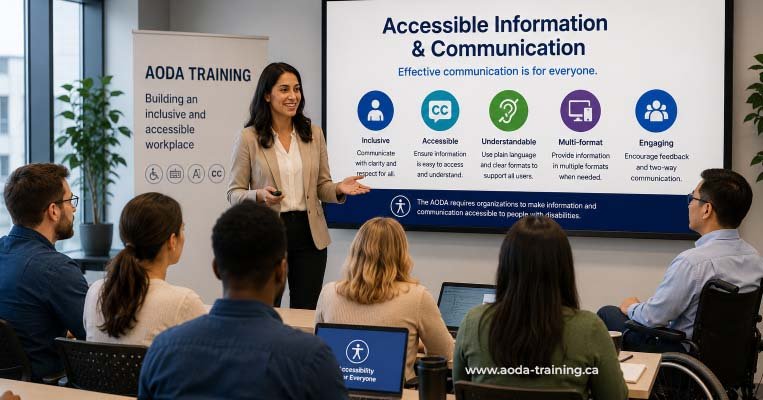
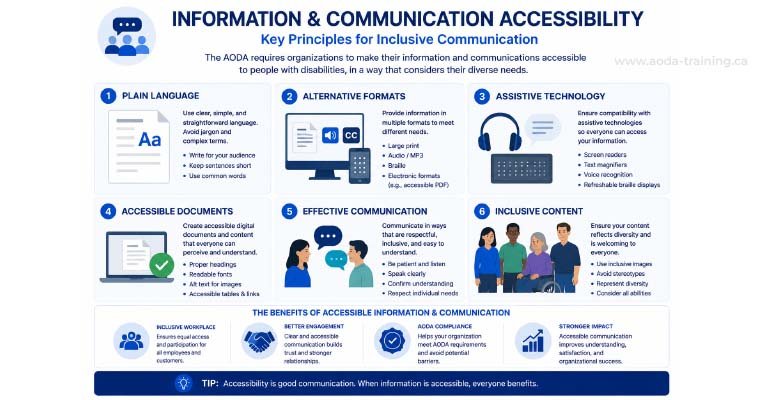
The Information and Communications Standard is Part III of the Integrated Accessibility Standards Regulation (IASR), Ontario Regulation 191/11. It requires organizations to make information and communications accessible to people with disabilities — both the content itself and the means by which it is delivered.
The Standard has four main components:
| Component | What it requires | Who it affects |
|---|---|---|
| Accessible formats on request | When a person with a disability requests information in an accessible format (large print, electronic, audio, Braille), the organization must provide it at no extra cost and in a timely manner. | All Ontario organizations with 1+ employee |
| Communication supports on request | When a person with a disability requests a communication support (captioning, sign language interpretation, reading assistance), the organization must arrange it at no extra cost. | All Ontario organizations with 1+ employee |
| Website accessibility (WCAG 2.0 Level AA) | Public-facing websites and web content must meet WCAG 2.0 Level AA. New content since January 2014 (1–49 employees) or all content since January 2021 (50+ employees). | All Ontario organizations with websites |
| Emergency procedure information | Workplace emergency procedures must be provided in accessible formats to employees with disabilities upon request. Organizations with 50+ employees must also prepare individualized emergency response information. | All Ontario organizations with 1+ employee |
Who Needs Information & Communications Standard Training?
The key question for training is whether a person’s role involves creating, editing, reviewing, publishing, or managing digital content or communications. If the answer is yes, they need I&CS training.
| Role | Training required? | Why |
|---|---|---|
| Web developers and front-end engineers | Yes | They build the code that determines whether a website is accessible. Developers who do not understand WCAG 2.0 Level AA will produce inaccessible code by default. |
| UX designers and digital designers | Yes | Design decisions — colour palette, typography, interactive component patterns — are the source of most colour contrast failures and focus indicator issues. |
| Content writers and copywriters | Yes | They write the alt text, headings, link text, and body copy that determines whether content is navigable and understandable for screen reader users. |
| Marketing managers and campaign managers | Yes | They commission and approve digital content. If they do not understand accessibility requirements, they will approve inaccessible content. |
| Social media managers | Yes | Social media posts with images require alt text. Videos require captions. Stories and reels require audio descriptions or text alternatives. |
| Email marketers | Yes | HTML email templates must meet WCAG colour contrast, structure requirements, and include plain text alternatives. |
| Document authors (Word, PDF, PowerPoint) | Yes | Anyone who creates documents that are published online or shared with the public must know how to create accessible documents. |
| IT and intranet administrators | Yes | Internal systems and intranets are covered by I&CS requirements for organizations with 50+ employees. |
| Communications and PR teams | Yes | Press releases, publications, and media content distributed digitally must be accessible. |
| HR teams (re: employee communications) | Partial — see Employment Standard training | HR teams need Employment Standard training for employee documents; I&CS training adds relevant context on accessible formats. |
What I&CS Training Covers by Role
Training content should be tailored to what each role actually does. A developer needs technical WCAG knowledge. A content writer needs practical writing guidance. A marketing manager needs decision-making frameworks. Giving everyone the same generic course produces teams that know what WCAG is but do not know how to apply it to their work.
- WCAG 2.0 Level AA success criteria — all 38 criteria at Level A and AA
- Semantic HTML — heading hierarchy, landmark regions, list structure, button vs link
- ARIA — roles, properties, states, when to use and when not to
- Keyboard navigation — Tab order, focus management, keyboard traps, skip links
- Form accessibility — labels, error identification, instructions, timeouts
- Custom component accessibility — tabs, modals, dropdowns, accordions
- How to test — axe DevTools, NVDA, VoiceOver, keyboard testing protocol
- Colour contrast requirements — 4.5:1 for body text, 3:1 for large text and UI components
- Focus indicators — what makes a visible focus state and minimum contrast requirements
- Touch target sizes — minimum 44×44px for interactive elements
- Typography and readability — line length, spacing, font choices for cognitive accessibility
- Motion and animation — reduced motion preferences, seizure-triggering content
- Component accessibility patterns — tabs, modals, tooltips
- How to hand off accessibility requirements to developers
- Alt text — when to write it, how to write it
- Heading structure — use headings as navigation
- Link text — avoid "read more"
- Plain language for accessibility
- Captions and transcripts
- Accessible documents
- PDF accessibility
- WCAG requirements for marketing content
- Briefing teams on accessibility
- Reviewing accessibility before publishing
- Email accessibility requirements
- Social media accessibility
- Accessible formats on request
- Accessible event promotion
Accessible Content: Practical Do's and Don'ts
Training is only useful if it translates to different habits and different outputs. Here are the most impactful accessible content practices for each content type.
Alt text for images
Alt text is not a description of what is in the image. It is a text alternative that conveys the same information the image conveys to a sighted user. The right alt text depends on why the image is on the page.
Headings
Headings are navigation tools for screen reader users, who can jump between headings to understand a page’s structure. A heading hierarchy that reflects the actual outline of the content is essential.
Link text
Screen reader users often navigate by scanning a list of all links on a page. Link text must make sense out of context — the destination or action should be clear from the link text alone.
Accessible documents (Word and PDF)
Every Word document exported to PDF carries the structure of the original Word file. Accessible PDFs begin with accessible Word documents. Documents published online are covered by the I&CS Standard’s requirement for accessible web content.
WCAG Compliance Deadlines Your Digital Teams Need to Know
Part of I&CS training should include the legal context — specifically, the deadlines that have already passed and the ongoing obligations your digital teams carry every time they publish content.
| Organization size | Web content obligation | Deadline status in 2026 |
|---|---|---|
| 1–49 employees | New websites and web content created or significantly updated after January 1, 2014 must meet WCAG 2.0 Level AA | Overdue — if your digital team has been creating content since 2014 without WCAG training, most of that content is likely non-compliant |
| 50+ employees | All public-facing websites and web content must meet WCAG 2.0 Level AA regardless of when it was created | Overdue — deadline was January 1, 2021. Every page published since then without accessibility training adds to the compliance debt |
| All sizes | Accessible formats of information must be provided on request at no extra cost and in a timely manner | Ongoing — this applies to every document, image, video, and communication your organization produces |
Integrating Accessibility into Your Digital Workflow
Training is the start. The goal is to make accessibility a natural part of how your digital team works, rather than a separate review process tacked on at the end.
- Check colour contrast of every design decision using the Colour Contrast Analyser or Figma plugins
- Annotate interactive components with expected ARIA roles and keyboard behaviour before handoff
- Include accessible state designs (focus, hover, error, disabled) in every component specification
- Run axe DevTools on every new page before marking a ticket as done
- Use semantic HTML elements rather than div-based components wherever possible
- Test keyboard navigation on every new interactive element before deployment
- Add alt text to every image in the CMS before publishing
- Apply heading styles from the CMS toolbar — not bold text with font size changes
- Review link text for all in-line links before publishing
- Caption all video content before it goes live
- Include an accessibility check in your content review checklist
- Run WAVE on new pages before sign-off
- Confirm documents are exported as tagged PDFs, not print-to-PDF
Frequently asked questions
Does AODA require separate training for digital and content teams?
- The IASR requires that staff be trained on the IASR requirements that apply to their role. For staff whose work involves digital content creation, that means training on the Information and Communications Standard — which is distinct from the Customer Service Standard training that all staff receive. In practice, many organizations combine IASR training into a single course with role-specific modules, rather than running separate training programmes. What matters is that the content-specific requirements are covered for the people who need them.
What level of WCAG knowledge should a content writer have after training?
- A content writer does not need to understand every technical aspect of WCAG. They need practical knowledge of the criteria that affect their work directly: alt text (1.1.1), heading structure (1.3.1, 2.4.6), link purpose (2.4.4), and error identification in forms (3.3.1 and 3.3.2 when they are writing form instructions). Writers who understand why these matter — not just what the rules say — make better accessibility decisions without constant oversight.
Is WCAG 2.0 Level AA still the current requirement under AODA?
- Yes, as of 2026. Ontario’s AODA Information and Communications Standard references WCAG 2.0 Level AA. The Ontario government has been consulting on updating this to align with WCAG 2.1 or 2.2, but no regulatory change has been confirmed. Digital teams should be aware of WCAG 2.1 updates — particularly around mobile accessibility, cognitive accessibility, and enhanced focus indicators — as the standard is likely to be updated in the coming years.
Do social media posts need to be accessible under AODA?
- Yes, to the extent that social media platforms allow. The Information and Communications Standard applies to all information and communications your organization publishes. Most major social media platforms now support alt text for images. Video content on social media should have captions. The obligation to provide accessible formats on request also applies to social media content — if a customer asks for an accessible version of content you posted, you should provide it.
If we use a website builder, who is responsible for accessibility?
- Your organization is responsible, not the platform. AODA obligations follow your organization — if you control the content published on a platform (even a third-party one), you are responsible for its accessibility. Website builders vary significantly in how well they support accessible development. Some generate inaccessible HTML by default. Your I&CS training should include understanding the accessibility limitations of your specific platform and the workarounds available within it.
Empower Your Team with Digital Accessibility
Ensure compliance, reduce legal risks, and build inclusive digital experiences.
Start AODA training for your team →Train Your Digital Team on the Information & Communications Standard
Our AODA training includes an I&CS module specifically designed for digital and content teams. It covers WCAG 2.0 Level AA requirements in practical terms — what each role needs to know, how to apply accessibility principles to day-to-day content decisions, and how to check your own work before publication.
- The Information and Communications Standard — what it requires and who it applies to
- Practical alt text: when to write it, how to write it, and when to leave it empty
- Accessible document creation in Word and PDF export best practices
- Social media accessibility: alt text, captions, and accessible formats
- WCAG 2.0 Level AA in plain language — the criteria that matter most for content creators
- Heading structure, link text, and accessible page layout
- Video captions and transcripts: requirements and how to produce them
- Completion certificate for every team member — your training record