
- AODA Training for Small Businesses
- AODA Training
AODA Training for Small Businesses: What You Actually Need
Small businesses in Ontario have real AODA training obligations from their first hire. Learn exactly what training is required, what it costs, and the fastest way to comply.
Quantity Discounts
Price per course
6 to 20 courses
$20.95
21 to 50 courses
$17.95
51 to 200 courses
$13.95
201+ courses
Custom offer
Small business owners often assume that AODA is something for large corporations to worry about. It is not. From the moment you hire your first employee in Ontario, you have legal training obligations under the Accessibility for Ontarians with Disabilities Act. The Customer Service Standard has been in force since 2012. The IASR training requirement has applied since 2014.
This page cuts through the complexity and tells you exactly what training your small business needs, what it costs, how long it takes, and the fastest practical path to compliance — without overcomplicating it.
What "Small Business" Means for AODA Training
AODA does not define ‘small business’ as a category. What it does is scale obligations to headcount. For training purposes, the key threshold is 1 employee — but additional obligations kick in at 20 and 50 employees. Here is exactly what applies at each band.
- › Customer Service Standard training: required for every employee, volunteer, and contractor who interacts with customers or helps develop accessibility policies
- › IASR training: required for all employees, covering the Integrated Accessibility Standards Regulation and the Ontario Human Rights Code as it relates to disability
- › Training must be delivered before or as soon as practicable after a person starts their role
- › Training must be re-delivered whenever your accessibility policies change
- › Training must cover your organization's specific accessibility policies — not just generic AODA content
All obligations from the 1–19 band, plus:
- › File an AODA compliance report with the Ontario government every 3 years (declare that staff have been trained, policies are in place, website meets standards)
All obligations from the 1–49 bands, plus:
- › Written accessibility policy that is publicly available
- › Multi-year accessibility plan that is publicly posted
- › Training records required for all staff
- › Documented Individual Accommodation Plan (IAP) process
- › Documented return-to-work process for employees returning from disability-related absence
- › All public-facing web content must meet WCAG 2.0 Level AA
The Minimum Training Requirement: What Every Small Business Must Cover
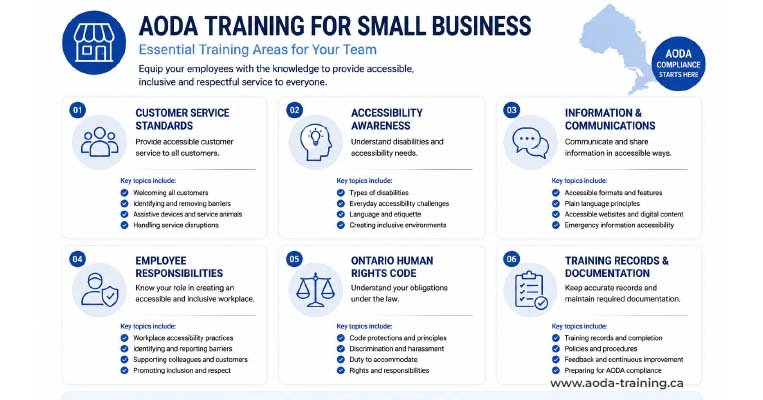
For a business with 1–19 employees, the core training requirement is straightforward. Every person who works for your organization must complete training that covers all of the following:
| Training content required | Why it must be included |
|---|---|
| The purposes of the AODA and the requirements of the Customer Service Standard | Staff cannot provide accessible service if they do not know what the law requires. |
| How to interact and communicate with people who have various types of disability | Practical disability interaction guidance is a mandated training element — not an optional add-on. |
| How to interact with people using assistive devices, guide dogs, and support persons | Staff who do not know your policy on service animals or support persons risk creating an AODA violation in a single interaction. |
| How to use any accessible equipment or devices available on your premises | If your business has a TTY device, an accessible door button, or any other accessible facility, staff must know how to help customers use it. |
| What to do if a person with a disability is having difficulty accessing your goods or services | Staff need a clear protocol for the moment something goes wrong — not just general awareness. |
| Your organization's specific accessibility policies | This is the requirement that most off-the-shelf training does not satisfy on its own. Your policies must be covered. |
| The IASR requirements that apply to each person's role | All staff need an overview. Managers need Employment Standard content. Digital staff need I&CS Standard content. |
| The Ontario Human Rights Code as it relates to persons with disabilities | Required by the IASR. Not a standalone module — can be integrated into broader IASR training. |
Training Options for Small Businesses: Free vs Paid
Small businesses have several training options at different price points. The right choice depends on your team size, how much you want to customize training to your policies, and whether you need completion records that hold up in an enforcement context.
Best for businesses with 1–5 employees wanting the fastest, cheapest path to baseline compliance.
- ›Completely free — no subscription or per-seat cost
- ›Covers all mandatory Customer Service Standard content
- ›Available online at accessforward.ca
- ›Generates a completion certificate
- ›Endorsed by the Ontario government
- ›Does not cover your organization's specific policies (must supplement separately)
- ›Limited IASR coverage — does not fully satisfy the IASR training requirement on its own
- ›No central tracking or reporting for employers with multiple staff
- ›Certificate is not employer-branded and cannot be customized
- ›Not updatable when your policies change
Best for businesses with 2–19 employees wanting full compliance with records, policy integration, and a manageable annual cost.
- ›Covers Customer Service Standard + IASR in a single course
- ›Policy content can be added or customized for your organization
- ›Employer dashboard tracks who has and hasn't completed training
- ›Completion certificates stored centrally and downloadable
- ›Onboarding-compatible — assign to new hires automatically
- ›Updated when Ontario accessibility standards change
- ›Costs money (though modest — $5–30 per seat)
- ›Requires choosing and setting up a platform
- ›Some platforms charge a flat annual fee regardless of seat count
Best for businesses with 5–19 employees where management wants to deliver training as a team experience, or where interactive discussion is important.
- ›Can be delivered to the whole team at once — efficient for shift-based businesses
- ›Allows discussion of your specific policies in real time
- ›Trainer can answer staff questions on the spot
- ›Can be combined with other onboarding or HR sessions
- ›Higher upfront cost than online options
- ›Does not easily accommodate new hires who join after the session
- ›Record-keeping falls to the employer — sign-in sheets, not platform-generated certificates
- ›Quality varies significantly between providers
Adding Your Policy Content to Training

The Customer Service Standard requires that training cover your organization’s specific accessibility policies. This means every course your staff complete must include your policies — not just the generic legal framework.
For small businesses that have not yet written an accessibility policy, this is a two-step process.
Step 1: Write a simple accessibility policy
You do not need a lawyer to write a basic accessibility policy. The Ontario government provides a sample template at ontario.ca/aoda. A compliant small business policy covers:
- Your commitment to providing accessible service to people with disabilities
- How staff are trained and when training is delivered
- Your approach to assistive devices — that customers may use personal assistive devices to access your services
- Your approach to service animals — that guide dogs and other service animals are welcome
- Your approach to support persons — that customers may be accompanied by a support person
- How customers can provide accessibility feedback and how you will respond
- What you do when a service or accessible facility is temporarily unavailable
A one-page policy covering these points is sufficient for most businesses with under 20 employees. It takes two to three hours to draft. Once written, it must be shared with all staff as part of training.
Step 2: Add the policy to your training
If you use an online training platform, most allow you to upload policy documents or add a policy review step that staff must complete before receiving their certificate. If you use the government’s free AccessForward course, supplement it with a policy document your staff read and sign — keep the signed copies as your record.
The Fastest Path to Compliance for a Small Business
If your small business has never delivered AODA training, here is the minimum viable compliance sequence — achievable in a single working week with no specialist help.
Training Mistakes Small Businesses Make Most Often
| Mistake | The problem | The fix |
|---|---|---|
| Training original staff once and never training again | Every person who joins after the original training session has never received training. AODA requires training for every worker, not just the founding team. | Add AODA training to your onboarding process. One-time training is not compliant — it is just the first delivery. |
| Using generic training without adding your specific policies | The Customer Service Standard requires training on your organization's specific policies. Generic courses do not include them because they do not know what they are. | Supplement any generic course with a policy document review. Have staff sign to confirm they have read it. Keep the signed record. |
| Thinking that having done training once means you are done | Training must be re-delivered whenever your accessibility policies change. A policy update without a training update is a compliance gap. | Set a reminder to review training content whenever you update your accessibility policy. Even a brief refresher on the changed content satisfies the requirement. |
| Not keeping any records | Without records, you cannot demonstrate that training happened. In a complaint investigation or compliance review, "we trained everyone" without documentation is not a defensible position. | Keep a simple spreadsheet with name, role, training course, and completion date for every staff member. Takes two minutes per hire. |
| Assuming volunteers and contractors do not need training | Volunteers who interact with the public or help develop policies need training. Contractors who deliver services to your customers on your behalf need training. | Include volunteers and relevant contractors in your training count and delivery. |
How Much Does AODA Training Cost for a Small Business?
| Business size | Recommended approach | Estimated cost |
|---|---|---|
| 1–3 employees | AccessForward (free) + one-page policy document + signed acknowledgement | $0 — costs only an hour or two of staff time |
| 4–10 employees | Online AODA training platform with policy integration + employer tracking dashboard | $25–$200 total (most platforms charge $5–20 per seat; some have flat annual fees of $50–$150) |
| 11–19 employees | Online AODA training platform with policy integration, role-specific modules for managers, central records | $100–$400 total depending on platform and seat count |
| 20–49 employees | Online platform + compliance report preparation support if needed | $200–$600 for training; $500–2,000 if professional compliance support is also needed before report filing |
Frequently asked questions
My business has 3 employees. Do we really need AODA training?
- Yes. AODA applies from the moment you have one employee. At three employees, you are required to train all three on the Customer Service Standard and IASR. The government’s free AccessForward course satisfies the core requirement and takes under an hour per person. There is no exemption for very small businesses.
How long does AODA training take for a small business?
- The core AODA training course takes 30–60 minutes to complete. Adding a policy review and sign-off adds another 15–20 minutes. For a team of 5 people, total training time is roughly 3–4 hours of staff time across the team. For a team of 15, it is approximately 8–12 hours across the team. This is a one-time investment that becomes an onboarding step going forward.
Can I deliver AODA training myself as the business owner?
- Yes, provided the training covers all the required content. Delivering your own training works best if you have good knowledge of the Customer Service Standard and IASR requirements. The risk of self-delivery is gaps in content coverage — particularly the IASR’s specific content requirements and the Human Rights Code element. Using an accredited online course and supplementing it with your own policy briefing is generally more reliable than fully self-delivered training.
Does training need to be repeated every year?
- No. AODA training does not have a mandatory annual renewal. Training must be delivered when someone starts, and re-delivered when your accessibility policies change. However, a brief annual review of your training content — checking whether your policies have changed and whether any new staff have joined — is good practice and prevents gaps from accumulating unnoticed.
What is the fastest free option for AODA training?
- The Ontario government’s AccessForward programme at accessforward.ca is the fastest free option. It covers Customer Service Standard training, takes 30–60 minutes, generates a completion certificate, and is available online 24/7. Supplement it with a written briefing on your specific accessibility policies and have staff sign to acknowledge they have read it. That combination satisfies the core training requirement at zero cost.
Do part-time and seasonal employees need AODA training?
- Yes. AODA training requirements apply to all workers regardless of hours, contract type, or season. A part-time employee working 10 hours a week has the same training obligation as a full-time employee. A seasonal worker employed for three months needs training before or as soon as practicable after starting. The fastest approach is to build AODA training into your onboarding process so every new hire receives it automatically.
Empower Your Team with Digital Accessibility
Ensure compliance, reduce legal risks, and build inclusive digital experiences.
Start AODA training for your team →Start AODA Training for Your Small Business Today
Our AODA training platform is designed for businesses of any size — from a sole trader with their first hire to a growing team of 50. Courses cover the Customer Service Standard and IASR in a single session, with space to add your own accessibility policies, automatic completion records, and per-seat pricing that scales with your team.
- Customer Service Standard training: four principles, disability interaction, assistive devices, service animals, support persons, disruption procedures
- Your organization's specific accessibility policies embedded in the course
- Employer dashboard: see who has completed training at a glance
- Per-seat pricing with no minimum — pay only for the staff you have
- IASR training: Employment Standard overview, Information & Communications Standard, Ontario Human Rights Code
- Completion certificate for every team member — your compliance record
- New hire assign-on-day-one — AODA training built into your onboarding