
- AODA Compliance Audit
AODA Accessibility Report: What's Included and What to Do With It
An accessibility audit report is not a certificate of compliance. It is a working document — a detailed record of every accessibility issue found during testing, why each one matters, and what needs to be done to fix it. Its value is entirely in how actionable it is.
Quantity Discounts
Price per course
6 to 20 courses
$20.95
21 to 50 courses
$17.95
51 to 200 courses
$13.95
201+ courses
Custom offer
An accessibility audit report is not a certificate of compliance. It is a working document — a detailed record of every accessibility issue found during testing, why each one matters, and what needs to be done to fix it. Its value is entirely in how actionable it is.
What a professional AODA accessibility report contains
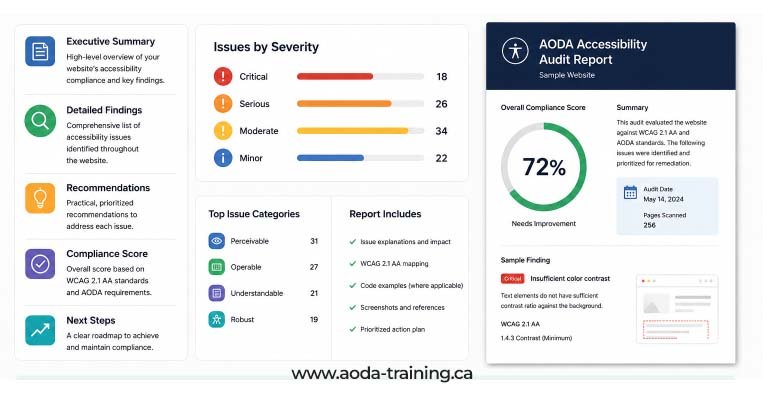
A well-structured accessibility audit report has six distinct sections. Each serves a specific purpose for a different audience: executives need the summary, developers need the technical findings, project managers need the remediation roadmap.
A one-to-two page overview of the audit scope, testing methodology, overall compliance status, and the most critical findings. Written for senior stakeholders who need the headline picture without technical detail.
Example content: Tested 22 pages across 4 templates on aoda-training.ca in March 2026. Identified 47 unique issues: 6 Critical, 14 Serious, 19 Moderate, 8 Minor. Primary risk areas: keyboard navigation failures on the course enrollment flow and missing alt text across product images.
Documents what was tested, how it was tested, and when. Includes the testing standard (WCAG 2.0 Level AA), the tools used, the browser and AT combinations tested, and the dates of testing. This section establishes the audit's credibility and is important for compliance documentation.
Example content: Testing conducted 10–14 March 2026. Standard: WCAG 2.0 Level AA. Tools: axe DevTools 4.x, WAVE 3.2, Colour Contrast Analyser 3.2. AT: NVDA 2024.1 + Firefox 124 (Windows 11); VoiceOver + Safari 17 (macOS Sonoma). Pages tested: [list of 22 URLs].
The core of the report. Each issue is documented with a consistent set of fields: WCAG criterion, conformance level, severity, location, description of the failure, user impact, screenshot or code excerpt, and a recommended fix. Issues are sorted by severity, then by frequency across pages.
Notes issues that appear on multiple pages because they originate from a shared template or component. Fixing the template fixes all instances simultaneously. This section helps development teams understand the scope of remediation effort and prevents duplication of work.
Example content: Colour contrast failure on navigation link hover state (WCAG 1.4.3): affects all 22 tested pages. Source: global nav CSS. One fix resolves all instances.
A prioritized action list that translates the issues list into a project plan. Issues are grouped by severity and owner (developer, designer, content editor, HR). Suggested timelines are included for critical and serious issues. Template issues are called out separately to clarify that one fix can resolve many findings.
Example content: Phase 1 (complete within 30 days): 6 Critical issues — keyboard navigation on enrollment flow, missing form labels on contact form, captions missing on 3 product videos. Phase 2 (30–60 days): 14 Serious issues...
Full page-by-page findings for reference, automated scan exports from axe and WAVE, and any additional documentation (document accessibility findings, policy review notes for full AODA audits). The appendices are the reference layer — the main report is built from them, but they are too detailed for primary use.
Example content: Appendix A: Full axe scan export (CSV). Appendix B: WAVE overlay screenshots for all 22 pages. Appendix C: Document accessibility findings for 4 PDFs tested.
What a single issue record looks like
Every issue in the report should be documented in a consistent format. Here is an example of what a well-documented finding looks like — this level of detail is what makes remediation possible without requiring the developer to go back to the auditor with questions.
<div class="enrol-btn"> element with a native
<button> element, or add
tabindex="0" and keydown event handling to the existing element.
Verify fix by tabbing through the page and confirming the button receives focus and can be activated with Enter.
Note the level of specificity: the issue is located to a specific element, the two affected pages are identified, the test method is stated, the user impact is concrete, and the fix is specific enough for a developer to implement without further clarification. This is what separates a useful audit report from a list of WCAG criterion names.
How severity ratings work
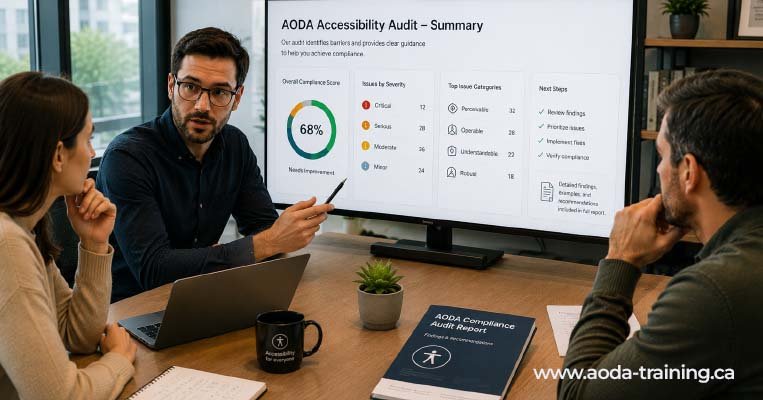
Every issue in an accessibility audit report should carry a severity rating. Severity ratings reflect the impact of the issue on users with disabilities and are the primary tool for prioritizing remediation.
| Severity | Definition | Remediation priority | Example |
|---|---|---|---|
| Critical | Prevents a user with a disability from accessing content or completing a task. No workaround is available. | Immediately — before next deployment if possible | A checkout form that cannot be submitted by keyboard. Blind users and keyboard-only users cannot purchase. |
| Serious | Significantly impairs access or task completion. A workaround may exist but is not obvious or requires significant effort. | Within 30 days | A dropdown navigation menu whose items can be reached by keyboard but not selected without a mouse. |
| Moderate | Causes difficulty but most users can still access content or complete the task with effort. | Within 60–90 days | Form placeholder text used as the only label, disappearing when the user types, making it hard to remember the field purpose. |
| Minor | Low impact on most users. Represents a technical WCAG failure but does not significantly impair usability. | Backlog — address in normal development cycle | A decorative image with alt text that could be improved but does not prevent access to information. |
What a good accessibility report does not include
| What to watch for | Why it is a problem |
|---|---|
| A compliance score or percentage | WCAG conformance is pass/fail, not scored. A 'score' combines fundamentally different issues into a number that obscures which failures actually matter. An issue that prevents blind users from completing a purchase is not equivalent to a minor alt text improvement. |
| A certificate of AODA compliance | An audit assesses your site at the time of testing. New content and code changes create new issues. No auditor can certify ongoing compliance — only compliance at the tested scope on the test date. |
| Legal advice or a legal compliance declaration | An audit report documents accessibility issues. Whether those issues constitute legal non-compliance is a question for legal counsel, not an accessibility auditor. |
| Vague remediation guidance | 'Improve alt text' or 'fix colour contrast' are not actionable recommendations. A developer needs specific information: which element, which page, what the code change should look like. |
| Issues listed without context | A list of WCAG criterion names with no description of what the failure is or where it appears is not a useful report. Developers cannot fix what they cannot find or understand. |
| Automated scan output presented as a manual audit | A report that is clearly an axe or WAVE export with no manual testing or AT evaluation is not an accessibility audit. It represents approximately 30–40% of what a full audit would find. |
How to act on an accessibility audit report
Receiving the report is the beginning of the compliance process, not the end. Organizations that treat the report as a project deliverable rather than a compliance document get the most value from it.
Step 1: Review the executive summary with your team
Before diving into individual issues, read the executive summary with the people responsible for fixing things. Confirm the critical findings and note the highest-risk areas before workload estimates are made.
Step 2: Route issues to the right owners
Developers for code issues, designers for colour contrast and focus indicators, content editors for alt text and link text, HR or compliance leads for policy and documentation findings. A shared project tracker works well.
Step 3: Start with Critical issues on high-traffic pages
Critical issues on the pages most users visit have the highest real-world impact. A Critical keyboard navigation failure on your homepage matters more than a Moderate contrast issue on a blog post from 2022.
Step 4: Address template issues once
Template-level findings appear on many pages but require a single fix. If a heading structure failure affects 80 pages because they all use the same template, one code fix resolves all 80 instances simultaneously.
Step 5: Retest and document
After each batch of fixes, retest the affected elements. Confirm that the fix resolves the issue correctly — it is common for a code change to fix one criterion while inadvertently creating another.
Step 6: Build accessibility into your workflow
Fixing existing issues without process change means new issues accumulate at the same rate. Add automated accessibility checks to your development pipeline and brief content editors on accessible writing.
Using an audit report for AODA compliance purposes

An accessibility audit report serves a specific function in your compliance programme: it documents that you assessed your accessibility status, identified gaps, and have a plan to address them. This documentation matters in several contexts.
Filing your AODA compliance report
Organizations with 20+ employees must file a compliance report every three years. An audit report produced before filing demonstrates that the declaration is based on an actual assessment rather than an assumption.
Responding to a government audit
If the Ontario government audits your organization, an audit report showing identified issues and a remediation plan in progress demonstrates good-faith effort — even if remediation is not yet complete.
Responding to a complaint
If an accessibility complaint is filed against your organization, an audit report demonstrating you had assessed your accessibility status and were actively remediating issues is the most useful documentation you can provide.
Communicating with customers and stakeholders
An audit report provides the factual basis for an accurate, honest accessibility statement on your website — noting your current compliance status, the date of your last audit, known remaining issues, and how users can request accessible alternatives.
Frequently asked questions
What is an AODA accessibility report?
- An AODA accessibility report is the documented output of an accessibility audit — a structured record of every issue found during testing, its WCAG criterion reference, its severity, where it appears, its impact on users, and the recommended fix. It is a working document for the remediation team and a compliance record for the organization.
How long should an accessibility audit report be?
- It depends entirely on how many issues are found. A small website with few issues might produce a 15–20 page report. A complex site with hundreds of issues across dozens of pages might produce a 60–100+ page report. Length is not a proxy for quality. A 10-page report that is specific, actionable, and complete is more valuable than a 100-page report full of vague findings.
Should I share the audit report publicly?
- Generally no. An accessibility report documents specific vulnerabilities in your website — it is a technical compliance document, not a public statement. An accessibility statement on your website (noting compliance status, audit date, known gaps, and how to request accessible alternatives) is the appropriate public-facing document. The full report should be treated as internal compliance documentation.
What should I do if the audit report contains hundreds of issues?
- Focus on severity, not volume. Work through the severity-based remediation roadmap in the report. Critical issues first, on high-traffic pages. Serious issues next. Use template analysis to identify fixes that resolve many instances at once. Most large-scale accessibility issues trace back to a small number of underlying root causes — fixing those root causes resolves the majority of findings.
Does an accessibility report expire?
- There is no formal expiry, but an audit report reflects a website at a point in time. For active websites where content and code changes regularly, findings from a report more than 12–18 months old may not reflect current site status. Major website redesigns, new CMS migrations, or significant content additions warrant a new audit.
Empower Your Team with Digital Accessibility
Ensure compliance, reduce legal risks, and build inclusive digital experiences.
Start AODA training for your team →Get an audit report your team can actually use
A good accessibility report gives your developers exactly what they need to fix issues: the criterion, the location, the impact, a screenshot, and the code-level fix. Our audit reports are structured for remediation — not for filing away.
- Executive summary suitable for senior stakeholder review
- Issues list with WCAG criterion, severity, location, screenshot, and code-level fix guidance for every finding
- Remediation roadmap prioritized by severity with suggested timelines
- Full methodology section: scope, tools, AT combinations, test dates
- Template analysis identifying which fixes resolve multiple pages simultaneously
- One walkthrough call with your team to review findings and answer questions