
- WCAG 2.0 vs 2.1 vs 2.2
- Website Accessibility
WCAG 2.0 vs 2.1 vs 2.2: What Changed and What It Means for You
WCAG 2.1 added 17 new criteria to 2.0. WCAG 2.2 added 9 more and removed one. This plain-language guide explains every version change and what Ontario organizations must do.
Quantity Discounts
Price per course
6 to 20 courses
$20.95
21 to 50 courses
$17.95
51 to 200 courses
$13.95
201+ courses
Custom offer
How WCAG Versioning Works
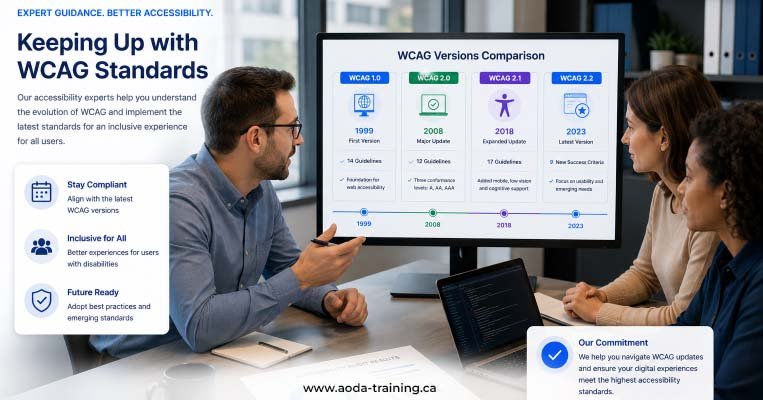
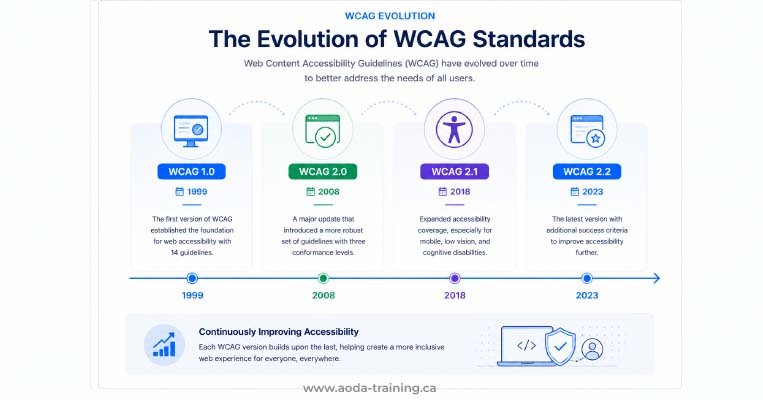
Each WCAG version is cumulative. WCAG 2.1 contains everything in WCAG 2.0 plus 17 new success criteria. WCAG 2.2 contains everything in WCAG 2.1 plus 9 new criteria and removes one that became obsolete. A site that meets WCAG 2.2 Level AA automatically meets WCAG 2.1 and WCAG 2.0. The versions are not competing standards — they are a progression.
The three WCAG conformance levels: A, AA, and AAA
WCAG organizes its success criteria into three levels of conformance. Each level builds on the previous one.
What WCAG 2.1 Added to 2.0
WCAG 2.1 was published in June 2018 to address gaps in 2.0, particularly around mobile accessibility, users with low vision, and users with cognitive and learning disabilities. It added 17 new success criteria across the four POUR principles.
New Level A Criteria in WCAG 2.1
autocomplete="name" and an email field uses autocomplete="email".
autocomplete="off", preventing browsers from identifying or pre-filling common personal fields.
role="status" so screen readers announce it without the user needing to navigate to it.
Selected New Level AA Criteria in WCAG 2.1
What WCAG 2.2 Added to 2.1
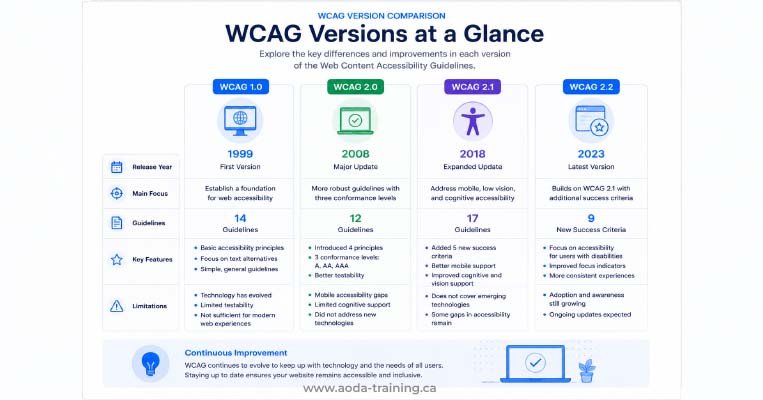
WCAG 2.2 was published on 5 October 2023. It adds 9 new success criteria and removes one obsolete criterion. The new criteria focus on keyboard users, users with cognitive and learning disabilities, and users on mobile and touch devices.
| Criterion | Level | Plain-language summary |
|---|---|---|
| 2.4.11 Focus Not Obscured (Minimum) | AA | Focused elements must not be fully hidden behind sticky headers, footers, or overlays. |
| 2.4.12 Focus Not Obscured (Enhanced) | AAA | Focused elements must not be hidden at all by author-created content. |
| 2.4.13 Focus Appearance | AAA | Focus indicators must meet minimum size and contrast requirements. |
| 2.5.7 Dragging Movements | AA | Any drag-based action must have a single-pointer (tap or click) alternative. |
| 2.5.8 Target Size (Minimum) | AA | Touch and pointer targets must be at least 24×24 CSS pixels or have adequate spacing. |
| 3.2.6 Consistent Help | A | Help mechanisms (chat, phone, FAQ) must appear in a consistent location across pages. |
| 3.3.7 Redundant Entry | A | Users must not be asked to re-enter information they have already provided in the same session. |
| 3.3.8 Accessible Authentication (Minimum) | AA | Login processes must not require users to solve puzzles, recall passwords, or transcribe codes without an alternative. |
| 3.3.9 Accessible Authentication (Enhanced) | AAA | Login must not require recognising objects or user-supplied images or media. |
The Four Most Impactful New WCAG 2.2 Criteria
Of the nine new criteria, four have the highest practical impact for Ontario organizations building or auditing websites in 2026. These are the ones most likely to appear in audit findings and most likely to affect real users.
Which Version Should Ontario Organizations Target?
For legal compliance with AODA’s Information and Communications Standard, WCAG 2.0 Level AA is the current requirement. However, three factors make targeting WCAG 2.2 the practical recommendation for any website being built or significantly updated in 2026.
| Factor | Why WCAG 2.2 is the right target |
|---|---|
| Backward compatibility | Meeting WCAG 2.2 automatically satisfies WCAG 2.1 and WCAG 2.0. There is no compliance cost to building to the higher standard. |
| Future-proofing | Ontario has begun signalling WCAG 2.2 will become the required standard. Organizations building to 2.0 now will face remediation work when the regulation updates. |
| Audit expectations | Accessibility auditors now typically assess against WCAG 2.1 and flag 2.2 issues. Building to 2.2 reduces audit findings. |
| User benefit | The new criteria in 2.1 and 2.2 directly address mobile usability, cognitive accessibility, and keyboard navigation — improvements that benefit all users. |
Frequently asked questions
Does AODA require WCAG 2.1 or 2.2?
- No. Ontario’s AODA Information and Communications Standard currently requires WCAG 2.0 Level AA. WCAG 2.1 and WCAG 2.2 are not yet legally mandated in Ontario. However, because WCAG versions are fully backward compatible, organizations that meet WCAG 2.2 Level AA automatically satisfy the current legal requirement.
Can I ignore WCAG 2.1 and 2.2 if I am already WCAG 2.0 compliant?
- Legally, yes — WCAG 2.0 Level AA is the current AODA requirement. Practically, no. WCAG 2.0 does not address mobile accessibility, modern touch interfaces, or cognitive accessibility in the depth that 2.1 and 2.2 do. An organization that is only WCAG 2.0 compliant may still have significant barriers for users on mobile devices and for users with cognitive disabilities.
Is WCAG 2.2 backward compatible with WCAG 2.0?
- Yes. WCAG 2.2 is fully backward compatible with both WCAG 2.1 and WCAG 2.0. A website that passes all WCAG 2.2 Level AA success criteria automatically passes all WCAG 2.1 Level AA and WCAG 2.0 Level AA criteria. The only change that could theoretically affect backward compatibility is the removal of 4.1.1 Parsing — but removing a criterion relaxes rather than tightens the requirement.
What is the difference between WCAG 2.1 and WCAG 2.2 in plain language?
- WCAG 2.1 added 17 criteria to WCAG 2.0, primarily to improve mobile accessibility and coverage for users with cognitive disabilities and low vision. WCAG 2.2 added 9 further criteria to WCAG 2.1, focusing on keyboard focus visibility, touch target sizes, drag-and-drop alternatives, consistent help, reducing repeated data entry, and accessible authentication. WCAG 2.2 also removed the Parsing criterion (4.1.1), which became obsolete as browsers modernised.
Will AODA be updated to require WCAG 2.2?
- Ontario has signalled an intention to update AODA digital accessibility requirements to reference WCAG 2.2. No formal regulation change has been published as of 2026. Organizations should monitor Ontario government accessibility review announcements and plan for a transition to WCAG 2.2 in their next major website update cycle.
What happened to WCAG 4.1.1 Parsing?
- Success Criterion 4.1.1 Parsing required HTML to be free of specific markup errors such as duplicate IDs and improperly nested elements. By the time WCAG 2.2 was finalized, modern browsers and screen readers had become sophisticated enough to handle these errors automatically. The criterion was removed because it no longer provided a meaningful accessibility benefit. If a previous audit flagged 4.1.1 failures, those findings are not applicable under WCAG 2.2.
Empower Your Team with Digital Accessibility
Ensure compliance, reduce legal risks, and build inclusive digital experiences.
Start AODA training for your team →Have Your Website Audited Against the Current Standard
Understanding which WCAG version applies is the first step. Knowing whether your specific website meets it requires testing. Our WCAG compliance audit covers automated scanning, manual testing, and screen reader evaluation — giving you a complete picture against WCAG 2.0, 2.1, and 2.2.
- Automated scanning with axe DevTools and WAVE across all key pages
- Screen reader testing with NVDA + Firefox (Windows) and VoiceOver + Safari (macOS and iOS)
- Version-by-version gap report showing where your site currently stands
- Manual testing of all WCAG 2.0, 2.1, and 2.2 Level AA criteria
- Keyboard navigation testing across all interactive elements
- Prioritized remediation roadmap with criterion reference and code-level fix