
- Website Accessibility
Website Accessibility Services: WCAG Compliance for Ontario
Ontario's AODA requires websites to meet WCAG 2.0 Level AA. This requirement has been in force since 2014 for smaller organizations and 2021 for larger ones. This guide explains what WCAG requires, the most common failures Ontario businesses face, and how professional accessibility services help you achieve and maintain compliance.
Quantity Discounts
Price per course
6 to 20 courses
$20.95
21 to 50 courses
$17.95
51 to 200 courses
$13.95
201+ courses
Custom offer
Ontario’s Accessibility for Ontarians with Disabilities Act requires websites to meet the Web Content Accessibility Guidelines — WCAG 2.0 Level AA. This requirement has been in force since 2014 for smaller organizations and since 2021 for larger ones. If your website was built or substantially updated after those dates and has not been tested for accessibility, it almost certainly has compliance gaps.
Website accessibility is not just a legal obligation. Approximately 2.6 million Ontarians live with a disability that affects how they use the internet. An inaccessible website excludes these users from your products, services, and information — and creates legal exposure under both AODA and the Ontario Human Rights Code.
Your AODA obligations follow your organization, not the platform you use. If you control the content on a website — whether built by an agency, hosted on Squarespace, Shopify, WordPress, or any other platform — you are responsible for its accessibility. Third-party builders do not transfer your legal obligation. Content you can modify must be made accessible.
The four WCAG principles: what they mean in practice

WCAG 2.0 is organized around four principles — Perceivable, Operable, Understandable, Robust (POUR). Every one of the 38 Level AA success criteria falls under one of these. Understanding the principles provides a framework for thinking about accessibility beyond individual rules.
Perceivable
All information must be presentable to users in ways they can perceive
If a user cannot see, hear, or otherwise sense your content, it is not perceivable. This principle drives requirements for alt text, captions, colour contrast, and content structure.
- › 1.1.1: All non-text content has a text alternative (alt text)
- › 1.2.2: Pre-recorded video has accurate captions
- › 1.3.1: Information conveyed by structure is in the markup, not just visually
- › 1.4.3: Text has a contrast ratio of at least 4.5:1 against its background
- › 1.4.4: Text can be resized to 200% without loss of content or function
Operable
Interface components and navigation must be operable by all users
If a user cannot interact with your site using their chosen input method — keyboard, switch access, voice control — the site is not operable. This principle drives keyboard accessibility, focus management, and skip navigation requirements.
- › 2.1.1: All functionality available by keyboard — not mouse-dependent
- › 2.1.2: No keyboard traps — users can always navigate away
- › 2.4.1: A skip navigation mechanism exists to bypass repeated header content
- › 2.4.3: Focus order is logical and follows the visual reading sequence
- › 2.4.6: Headings and labels are descriptive, not generic
- › 2.4.7: Focus indicator is visible on all interactive elements
Understandable
Information and the operation of the interface must be understandable
If users cannot understand your content or predict how your interface will behave, it fails this principle. This drives requirements for form error messages, visible labels, and consistent navigation.
- › 3.1.1: The language of the page is identified in the HTML
- › 3.3.1: Form errors identify the problem field and describe the error in text
- › 3.3.2: Form fields have labels or instructions that describe the required input
Robust
Content must be reliably interpreted by assistive technologies
If your code breaks screen readers or other assistive technologies, it fails this principle. This drives requirements for valid HTML, ARIA implementation, and custom component accessibility.
- › 4.1.1: HTML is valid — no duplicate IDs, missing closing tags, or illegal nesting
- › 4.1.2: All UI components have a name, role, and value that can be programmatically determined
Who must comply: WCAG obligations by organization size
| Organization | Web content obligation | Current status |
|---|---|---|
| 1–49 employees (private/non-profit) | All web content created or significantly updated after January 1, 2014 must meet WCAG 2.0 Level AA | Required now — applies to all pages created or substantially refreshed since 2014 |
| 50+ employees (private/non-profit) | All public-facing websites and web content must meet WCAG 2.0 Level AA — including content created before 2014 | Required now — applies to the entire public-facing website with no legacy exemptions |
| Designated public sector (all sizes) | All internet websites must conform to WCAG 2.0 Level AA | Required now — strictest obligations with the earliest deadlines |
The most common website accessibility failures in Ontario
Professional accessibility audits across Ontario websites consistently reveal the same categories of failure. These are the issues most likely to be found on your site.
| Failure | WCAG | Who it affects | Fix complexity |
|---|---|---|---|
| Insufficient colour contrast between text and background | 1.4.3 | Users with low vision, colour blindness, and anyone in bright light | Low–Medium: CSS change; may require design system update if widespread |
| Missing or meaningless alt text on images | 1.1.1 | Blind users and screen reader users cannot access visual information | Low: content edit; requires content team training to prevent recurrence |
| Navigation menus that cannot be operated by keyboard | 2.1.1 | Blind users, users with motor impairments, keyboard-only users | Medium: JavaScript rebuild of navigation component |
| Form fields without visible labels (placeholder text only) | 3.3.2 | All users when placeholder disappears on input; screen reader users throughout | Low: add <label> elements; label text must describe expected input |
| Videos without captions | 1.2.2 | Deaf and hard-of-hearing users; anyone in a noisy environment | Medium: caption production and review; auto-generated captions insufficient without review |
| Custom interactive components without ARIA (tabs, modals, accordions) | 4.1.2 | Screen reader users cannot identify or operate non-native components | Medium–High: add ARIA roles, properties, and states; retest with AT |
| Vague link text ("Click here", "Read more", "Learn more") | 2.4.4 | Screen reader users navigating by link list cannot determine destinations | Low: content edit; requires content team training |
| No skip navigation link | 2.4.1 | Keyboard and screen reader users must Tab through entire header on every page | Low: single HTML/CSS addition; one fix for the whole site |
| PDFs not tagged for accessibility | 1.3.1 | Screen reader users receive garbled or no content from untagged PDFs | Medium–High: PDF remediation is time-intensive; volume-dependent |
| Focus indicator not visible on interactive elements | 2.4.7 | Keyboard users cannot see where they are on the page | Low: CSS update to ensure visible focus ring on all interactive elements |
Website accessibility services: what we offer
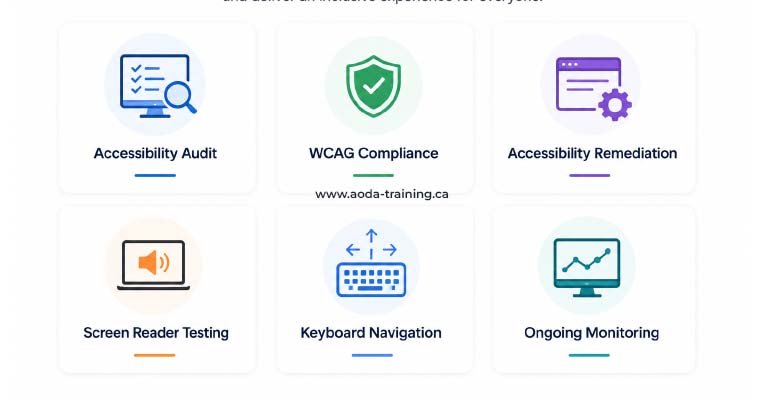
Our website accessibility services cover the full compliance journey — from initial assessment through remediation, testing, and ongoing monitoring. Each service is scoped to your organization’s size, technology, and compliance timeline.
WCAG Compliance Audit
A professional assessment of your website against WCAG 2.0 Level AA using automated scanning, manual expert testing, and screen reader evaluation. The foundation of any accessibility programme.
- ✓ Automanated scan with axe and WAVE across all key pages
- ✓ Manual WCAG 2.0 Level AA testing by a trained accessibility specialist
- ✓ Screen reader testing: NVDA + Firefox (Windows), VoiceOver + Safari (macOS and iOS)
- ✓ Prioritized report: every issue with WCAG reference, severity, screenshot, and fix guidance
- ✓ Remediation roadmap so your team knows where to start
Accessibility Remediation
Expert implementation of fixes identified in an accessibility audit. We work with your development team or handle remediation ourselves, then retest to confirm resolution.
- ✓ Developer-facing fix guidance with code examples
- ✓ ARIA implementation for custom interactive components
- ✓ Keyboard navigation fixes including focus management
- ✓ Alt text review and content editor training
- ✓ Post-remediation retesting and confirmation report
WCAG Training for Development and Content Teams
Role-specific training that gives your developers, designers, and content writers the knowledge to build and publish accessible content from the start — preventing new accessibility debt.
- ✓ Developer training: WCAG 2.0 Level AA, semantic HTML, ARIA, keyboard testing
- ✓ Designer training: colour contrast, focus indicators, accessible component patterns
- ✓ Content writer training: alt text, heading structure, link text, accessible documents
- ✓ Completion certificates and training records for all participants
Ongoing Accessibility Monitoring
Continuous automated scanning and periodic manual reviews to catch new accessibility issues as your website evolves. New content and code changes introduce new issues — monitoring catches them before they accumulate.
- ✓ Scheduled automated scanning with new issue alerts
- ✓ Quarterly or biannual manual review of high-traffic pages
- ✓ Compliance tracking dashboard
- ✓ Annual full audit included in annual plans
- ✓ Supports compliance report preparation every three years
Accessibility Statement and Documentation
A professionally drafted accessibility statement for your website, plus the policy documentation required for AODA compliance — written, formatted, and ready to publish.
- ✓ WCAG conformance statement with current compliance status
- ✓ Known limitations and remediation timeline
- ✓ Contact information for users to request accessible formats
- ✓ AODA accessibility policy document (if required or requested)
WCAG versions: 2.0, 2.1, and 2.2
| Version | Published | AODA requirement? | What it adds |
|---|---|---|---|
| WCAG 2.0 | 2008 | Yes — currently required for AODA | The original 38 Level A and AA criteria. Focuses on desktop web; limited mobile guidance. |
| WCAG 2.1 | 2018 | Not currently required; Ontario consulting on adoption | 17 new criteria. Key additions: mobile accessibility, users with low vision, cognitive accessibility. Notably adds 1.4.10 (reflow/responsive), 1.4.11 (non-text contrast), 2.5.3 (label in name). |
| WCAG 2.2 | 2023 | Not required; likely future standard | 9 new criteria. Focus on cognitive disabilities, mobile, and authentication. Removes 4.1.1 (parsing). Adds 2.4.11 (focus appearance), 3.2.6 (consistent help), 3.3.7 (redundant entry). |
The business case for website accessibility
| Reason | What it means for your organization |
|---|---|
| Market reach | Approximately 22% of Canadians have a disability. An inaccessible website excludes a significant portion of potential customers. For e-commerce businesses, checkout accessibility is both a compliance issue and a direct revenue issue. |
| SEO benefits | Many WCAG requirements align directly with search engine best practices: semantic heading structure, descriptive link text, alt text for images, and mobile compatibility. Accessible websites tend to rank better. |
| Legal risk reduction | AODA fines reach $100,000 per day for organizations. The Ontario Human Rights Code provides a separate and often faster enforcement path. Website accessibility failures are among the most common triggers for both. |
| Broader device compatibility | Accessible websites work better for all users: people using voice search, mobile users, users with slow connections, people in bright sunlight who need high contrast, and older users who increase font size. |
| Procurement advantage | Government contracts and institutional procurement increasingly require AODA compliance evidence. An accessible website with a compliance statement is a competitive differentiator in these markets. |
Start your website accessibility journey
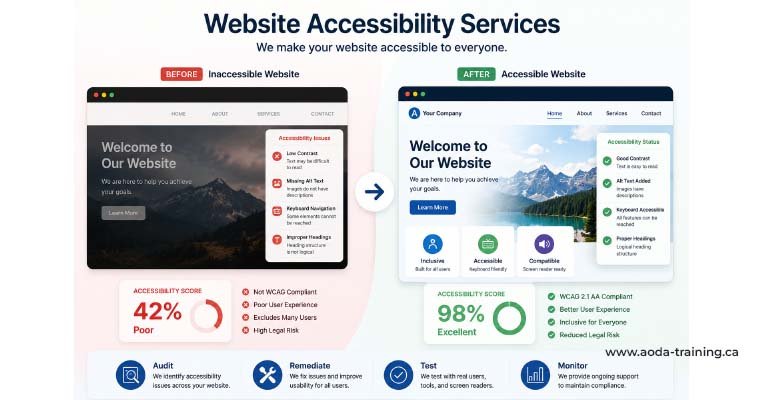
Whether you need an initial audit to understand your compliance status, expert remediation to fix what’s been found, training to stop new issues being created, or ongoing monitoring to maintain compliance as your site evolves — the process follows a clear sequence.
WCAG compliance guide — all 10 cluster pages
Frequently asked questions
What does WCAG 2.0 Level AA compliance actually require?
- WCAG 2.0 Level AA requires your website to meet 38 success criteria across four principles: Perceivable, Operable, Understandable, and Robust. Each criterion is a testable pass/fail requirement. In practice, the most impactful requirements are: images have accurate alt text, videos have reviewed captions, text meets colour contrast minimums, all functions work by keyboard, forms have visible labels, errors are identified in text, and custom components are built with ARIA so screen readers can interpret them.
How long does it take to make a website WCAG compliant?
- Timeline depends on the site’s size and the volume of issues found. For a small business website (10–20 pages), a professional audit takes two to three weeks and remediation of critical and serious issues typically takes two to six weeks of developer and content team time. For larger or more complex sites, the full remediation cycle may take three to six months. Starting with the highest-impact issues on your highest-traffic pages is the most efficient approach.
Is WCAG 2.0 Level AA the same as AODA compliance?
- WCAG 2.0 Level AA compliance for your website is a component of AODA compliance — not the whole of it. AODA also requires staff training, accessible policies, employment practices, and accessible formats on request. A website that fully meets WCAG 2.0 Level AA is compliant with the website-related component of the Information and Communications Standard, but the organization still has other AODA obligations to meet.
Can I use an accessibility overlay tool to achieve WCAG compliance?
- No. Accessibility overlay products — JavaScript plugins that claim to make websites WCAG compliant automatically — do not produce genuine compliance. They have been rejected as inadequate by accessibility specialists, disabled user communities, and courts in multiple jurisdictions. They do not protect your organization from AODA enforcement. Genuine WCAG compliance requires fixing the underlying code and content — not adding a layer on top of it.
What is an accessibility statement and do I need one?
- An accessibility statement is a page on your website that describes your current WCAG compliance status, any known accessibility limitations, your remediation plans, and how users can request accessible alternatives or report barriers. It is not legally required under AODA but is strongly recommended — it demonstrates transparency, provides a channel for user feedback, and is increasingly expected by government procurement processes.
What is the difference between ADA, AODA, and WCAG?
- AODA is Ontario’s Accessibility for Ontarians with Disabilities Act — the provincial law that requires Ontario organizations to meet accessibility standards. The ADA (Americans with Disabilities Act) is US federal law with similar but distinct website accessibility requirements. WCAG is the international technical standard — the Web Content Accessibility Guidelines — that both AODA and ADA courts reference when evaluating website accessibility. Meeting WCAG 2.0 Level AA positions your organization well for compliance under both frameworks, though they differ in their legal specifics.
Empower Your Team with Digital Accessibility
Ensure compliance, reduce legal risks, and build inclusive digital experiences.
Start AODA training for your team →Find out whether your website meets WCAG 2.0 Level AA
Our professional website accessibility audit covers automated scanning, manual WCAG testing by a trained specialist, and screen reader evaluation with NVDA and VoiceOver. You get a complete, prioritized picture of where your site stands — with code-level fix guidance your development team can act on directly.
- Automated scanning with axe DevTools and WAVE across all key pages
- Screen reader testing: NVDA + Firefox (Windows) and VoiceOver + Safari (macOS and iOS)
- Prioritized report: WCAG criterion, severity, screenshot, and code-level fix for every issue
- Manual WCAG 2.0 Level AA testing by a trained accessibility specialist
- Keyboard navigation testing across all interactive elements
- Remediation roadmap so your team knows where to start