
- Accessibility Statement
- Website Accessibility
Accessibility Statement: What to Include & Ontario Requirements
Ontario organizations must publish an accessibility statement and multi-year plan. Learn exactly what to include, what the AODA requires, and how to write a statement that is legally defensible.
Quantity Discounts
Price per course
6 to 20 courses
$20.95
21 to 50 courses
$17.95
51 to 200 courses
$13.95
201+ courses
Custom offer
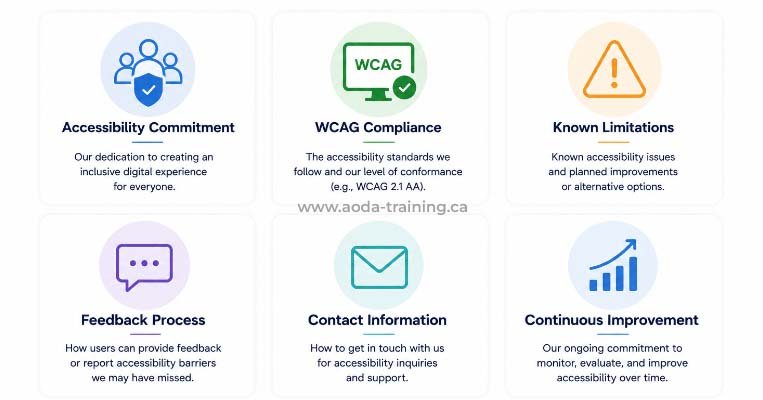
An accessibility statement is a public-facing page explaining your commitment to accessibility, the standard you follow, known limitations, and how users can report barriers. For Ontario organizations it serves two purposes: it satisfies specific AODA obligations, and it signals credibility to users, procurement teams, and the Accessibility Directorate.
What the AODA Requires
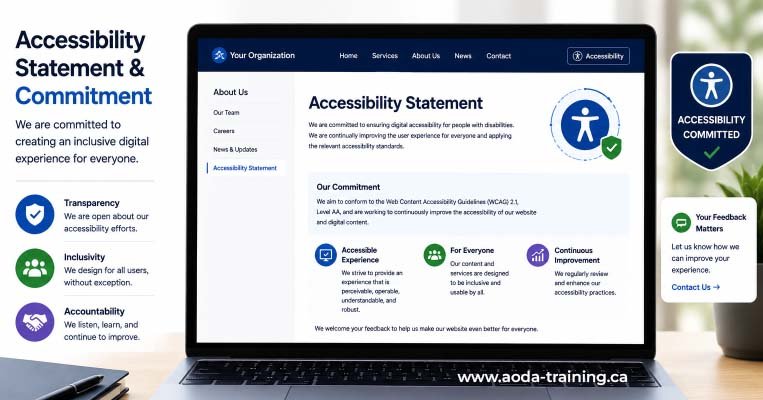
The AODA does not use the phrase ‘accessibility statement’ but requires organizations above certain size thresholds to publish three documents. Publishing a single accessibility page that combines them is standard practice.
| Document | Who must publish | Key requirement |
|---|---|---|
| Statement of commitment | 50+ employees; all designated public sector | Publicly available; accessible format on request |
| Written accessibility policies | 50+ employees; all designated public sector | Publicly available; accessible format on request |
| Multi-year accessibility plan | 50+ employees; all designated public sector | Posted on website; updated at least every five years |
| Accessibility compliance report | Private/non-profit 20+ employees; all public sector | Filed with Ontario government — next deadline December 31, 2026 (private/non-profit); December 31, 2025 (public sector) |
The Nine Components of a Complete Statement
The W3C WAI Accessibility Statement Generator (w3.org/WAI/planning/statements/generator) covers the internationally recommended components. All nine below are required for a complete, legally defensible Ontario statement.
Name your organization and the specific URL(s) the statement covers. Multiple sites need separate statements or explicit listing.
State the standard you are working toward and why. Do not use generic boilerplate — this statement must reflect your organization's specific situation.
Do not claim full conformance without audit evidence — any automated scan can disprove it. Most sites should claim partial conformance with exceptions listed under Known Limitations.
List specific issues: the affected content, the WCAG criterion, why it is not yet fixed, a user workaround, and a target remediation date. Vague language ('some content may not be accessible') provides no protection and no value.
List the technologies the site relies on for accessibility, and the browser and assistive technology combinations used in testing.
State how the site was evaluated: self-assessment, internal review, or third-party audit. Include the date. A named external audit carries significantly more weight with regulators and procurement teams.
Provide email, phone, and a stated response time — the feedback channel itself must be accessible.
Acknowledge the user's right to escalate unresolved complaints to the Accessibility Directorate of Ontario and provide the escalation contact.
Include the date last reviewed and when you will review it again. Undated or years-old statements signal that accessibility is not actively maintained.
Credible vs. Liability: What Makes the Difference
There are four HTML patterns that create a valid programmatic association between a label and its input. The first two are preferred — they require no ARIA and work reliably across all browsers and assistive technologies.
| Element | Credible | Liability risk |
|---|---|---|
| Conformance claim |
Partially conformant with specific listed exceptions
|
Fully conformant — claimed without audit evidence; disproved by any automated scan
|
| Known limitations |
Specific issues named with criterion, workaround, and timeline
|
Empty, or vague 'some content may not be fully accessible'
|
| Assessment basis |
Third-party audit with named auditor and date
|
Self-assessment with no methodology, or no mention of assessment at all
|
| Feedback mechanism |
Working email and phone; stated response time; page is accessible
|
Broken link, unmonitored inbox, or inaccessible contact form
|
| Date |
Reviewed within 12 months; update schedule stated
|
Undated or more than two years out of date
|
Multi-Year Accessibility Plan: What It Must Include
The plan is separate from the statement. The statement describes where you are now; the plan describes the specific steps you will take to improve, with timelines and named owners. Required for Ontario organizations with 50+ employees and all public sector bodies.
| Required element | Common gap |
|---|---|
| Statement of commitment from senior leadership |
Generic boilerplate not specific to the organization
|
| Current barriers identified across all five AODA standards |
Limiting assessment to the website only; ignoring employment, physical spaces, and other communications channels
|
| Specific steps with named owners and target dates — e.g. "We will complete a WCAG 2.1 audit by Q3 2026" not "We will improve accessibility" |
Vague aspirations with no measurable outcomes or accountability
|
| Progress update on the previous plan (required on renewal) |
Omitting this section, which demonstrates ongoing accountability
|
| Note on consultation with people with disabilities |
Omitting this, which is an IASR requirement
|
| Plan posted on website in accessible format |
Posting a non-tagged PDF that is itself inaccessible
|
Where to Publish and How Often to Update
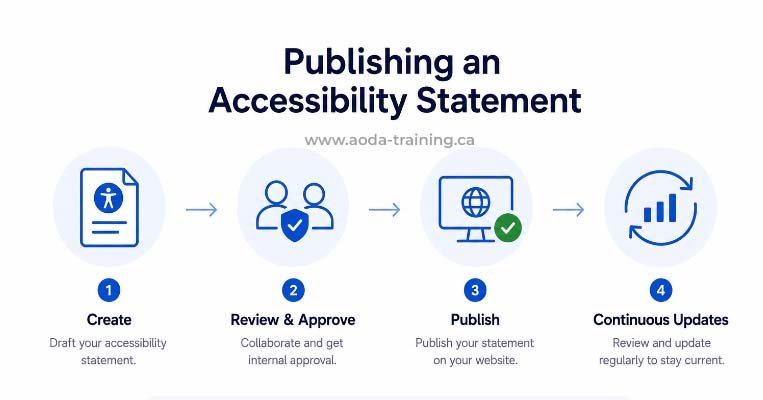
Place a link labelled ‘Accessibility’ or ‘Accessibility Statement’ in the footer on every page. Use a clean URL (/accessibility or /accessibility-statement). The page must itself be accessible — it would be indefensible if it were not.
Update triggers: annual review minimum; after any significant redesign or replatform; after completion of a new audit; when known limitations are resolved; when contact information changes.
Frequently asked questions
Can I copy another organization's accessibility statement?
- No. A copied statement contains inaccurate information about your site’s conformance status, known limitations, and contact details. If it claims full conformance and your site does not meet that standard, you have published a false compliance claim. Your statement must reflect your organization’s actual situation.
What if my site has many accessibility failures?
- Publish an honest partial conformance statement with your known limitations listed and a remediation plan. An honest statement from an organization actively working on accessibility is far better legally and reputationally than a false full-conformance claim or no statement at all.
What is the difference between a VPAT and an accessibility statement?
- An accessibility statement is a public-facing page for users and regulators, written in plain language. A VPAT (Voluntary Product Accessibility Template) is a technical conformance report shared during procurement — it maps every WCAG criterion to a conformance level. Organizations selling to government or enterprise clients typically need both.
Does the accessibility statement page itself need to be accessible?
- Yes. Your accessibility statement must meet the same WCAG requirements as the rest of your site. Run it through an automated scan and a keyboard navigation check before publishing. A statement page with accessibility failures is both ironic and indefensible.
Empower Your Team with Digital Accessibility
Ensure compliance, reduce legal risks, and build inclusive digital experiences.
Start AODA training for your team →Get Help Writing a Credible Accessibility Statement
An accurate statement requires knowing your actual conformance status — which means conducting an audit first. We can audit your site, draft your statement, and prepare your multi-year plan so every document reflects a real assessment.
- WCAG 2.1 Level AA audit to establish accurate conformance status before writing the statement
- Multi-year accessibility plan preparation with specific, accountable language
- Compliance report guidance for the December 2026 AODA filing deadline
- Drafting or reviewing your accessibility statement for completeness and AODA compliance
- VPAT / Accessibility Conformance Report for government and enterprise procurement
- Annual review service to keep your statement current after each audit cycle